
Snaptik – Download TikTok Videos Without Watermark in HD
SnapTik – The Fast & Easy TikTok Video Downloader


Download TikTok Videos Easily
Downloading TikTok videos is simple with SnapTik. Just copy the TikTok video link, paste it into the downloader, and download your video in just a few clicks.
Fast TikTok Video Downloads
Enjoy fast TikTok video downloads with SnapTik, with download speeds of up to 15MB/s for quick and convenient saving.
Download TikTok Videos Without Watermark
Save TikTok videos in Full HD quality without the TikTok watermark for a clean and distraction-free viewing experience.
Why Choose SnapTik for TikTok Video Downloads?
SnapTik is a simple TikTok video downloader that helps users save their favorite TikTok videos without watermarks. You can download videos quickly without creating an account or installing additional software. SnapTikApp is an independent service and has no partnership or affiliation with ByteDance, the parent company of TikTok. We continuously improve the platform to provide a fast and convenient downloading experience. For details about how we handle information, please review our Privacy Policy.
How to Download TikTok Videos Without Watermark at Snaptik
If you want to download TikTok videos without watermark at Snaptik, you can save a TikTok video in just a few simple steps. You do not need to install an additional app or follow a complicated process. Simply, copy the TikTok video link, paste it into Snaptik, and download the video to your device.
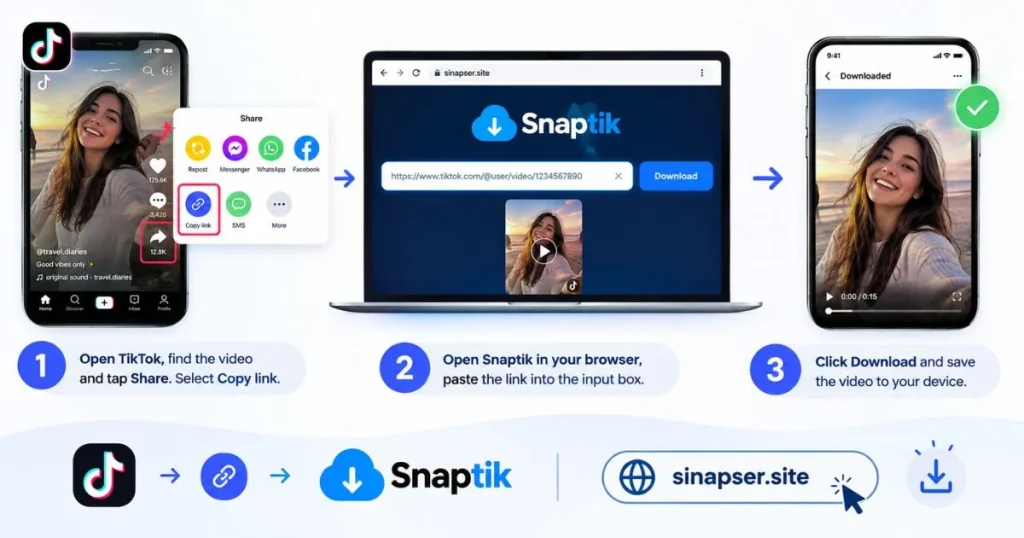
Follow the guide below to learn how to download TikTok videos without watermark at Snaptik.
Step 1: Find the TikTok Video You Want to Download
Open the TikTok app and find the video you want to save. Once you have found the video, tap the Share button on the side of the screen.
A sharing menu will appear with several options. Select Copy link to copy the URL of the TikTok video to your device’s clipboard.
Make sure you copy the link from the specific TikTok video you want to download. This allows Snaptik to identify the correct video when you paste the link.
Step 2: Paste the TikTok Video Link into Snaptik
Open Snaptik in your web browser and locate the input box at the top of the website.
Tap inside the input box and paste the TikTok video link you copied in the previous step. Check that the complete link has been added before continuing.
You do not need to manually enter the video URL. Using the Copy link option from TikTok makes the process faster and helps avoid typing mistakes.
Step 3: Click the Download Button
After pasting the TikTok link, click the Download button.
Snaptik will process the video link and provide the available download option. Follow the on-screen instructions to save the video to your device.
Depending on your device and browser, the downloaded TikTok video may appear in your Downloads folder or your device’s selected download location.
Save TikTok Videos Without Watermark
That’s it. The process only takes a few seconds when you have the TikTok link ready. You simply copy the TikTok video link, paste it into Snaptik, and click Download.
If you are using Snaptik for the first time, remember these three steps:
- Open TikTok and copy the video link.
- Paste the link into the Snaptik input box.
- Click Download to save the video.
This simple process makes it easy to download TikTok videos without watermark at Snaptik from your browser without going through a complicated setup.
Features of the SnapTik TikTok Video Downloader Tool
SnapTik is designed to make downloading TikTok content simple and convenient. You can use the tool directly from your browser without installing additional software or signing in to a TikTok account. Simply provide the TikTok video link and use the available download option.

Easy and Fast TikTok Downloads
Download TikTok videos quickly, easily, and safely using a simple link-based process. Copy the TikTok video URL, paste it into SnapTik, and start the download without following complicated steps.
No TikTok Login Required
No TikTok account login is required to use the SnapTik TikTok video downloader. You can download content without entering your TikTok username, password, or account information.
Download Videos in MP4 or Audio in MP3
Download videos in MP4 format or audio in MP3 with a single click. This gives you flexibility when you only need the video or want to save the available audio separately.
Original Video Resolution and Quality
Save videos and images in their original resolution and quality when the source and download option support it. This helps you keep the visual quality of the TikTok content instead of unnecessarily reducing its resolution.
No Registration or Sign-Up
Download TikTok videos without signing in or registering. There is no need to create a separate SnapTik account before using the downloader.
Fast Download Speed
Blazing fast speed: SnapTik is built to process TikTok download requests quickly, helping you get your video without unnecessary waiting. Actual download speed can vary depending on your internet connection, device, video size, and server conditions.
Simple Browser-Based Tool
SnapTik works through your web browser, making the process straightforward on both mobile and desktop devices. You can use the downloader without installing an additional TikTok downloader application.
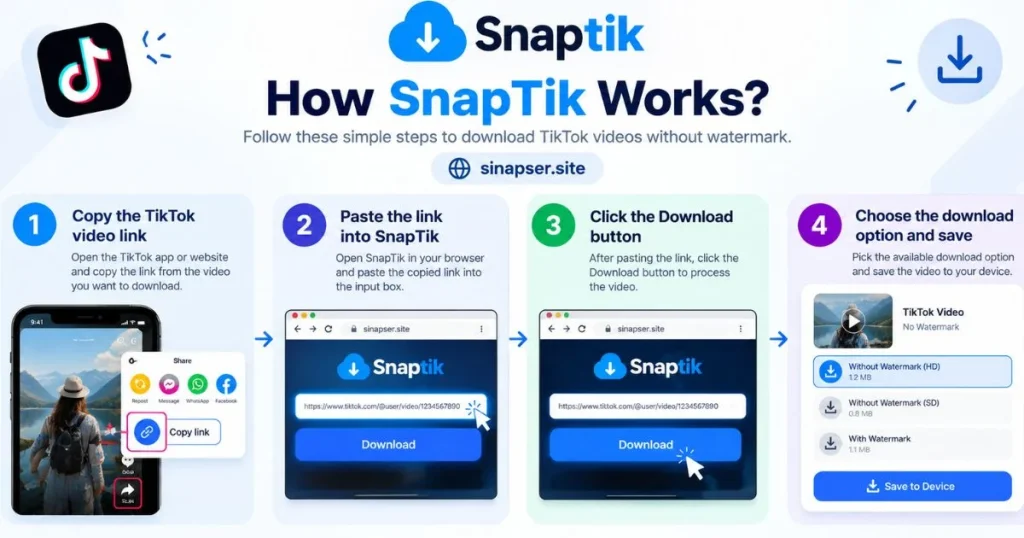
How SnapTik Works?
Using the tool is simple:
- Copy the TikTok video link from the TikTok app or website.
- Paste the link into the SnapTik downloader input box.
- Click the Download button to process the video.
- Choose the available download option and save the content to your device.
By using this service, you agree to our Terms of Use.
Premium Features of SnapTik
SnapTik is a simple online tool designed to make downloading TikTok videos without watermark easier. You can use it directly from your browser without installing additional software or creating an account. Simply find the TikTok video you want to save, copy its link, paste the URL into the SnapTik website, and start the download.
To get started, visit SnapTik and paste your TikTok video link into the downloader. You can also learn more about us to understand more about the platform and its purpose.
No Watermark
Download TikTok videos without the TikTok watermark overlay. SnapTik is designed to provide a clean version of the video without the visible watermark that normally appears on downloaded TikTok content.
This makes the saved video easier to watch and organize on your device. The available output can depend on the source video and the downloader’s processing options.
Full HD Quality
Save TikTok videos in Full HD quality when the original video and available download source support it. SnapTik aims to preserve the video’s resolution and visual quality during the download process.
This helps you enjoy clearer playback instead of unnecessarily compressed or low-resolution videos.
Compatible With All Major Devices
Use SnapTik on desktop, PC, iOS, and Android devices. Because the downloader works through a web browser, you can access it from different devices without needing to install a separate application.
Whether you are using a smartphone, tablet, laptop, or desktop computer, the basic process remains the same: copy the TikTok link, paste it into SnapTik, and download the available file.
Easy to Use
Download a TikTok video in just 3 simple steps. You do not need technical knowledge or complicated settings to use the tool.
- Copy the link of the TikTok video.
- Paste the link into the SnapTik downloader.
- Download the available video to your device.
The straightforward process makes SnapTik suitable for users who want a quick way to save TikTok videos from their browser.
Ultra-Fast Download
SnapTik is designed for fast TikTok video processing and downloads. Download performance can vary depending on your internet connection, device, video size, server traffic, and the source video’s availability.
For supported videos and a stable connection, the downloader can process requests quickly so you spend less time waiting for your video to be ready.
Completely Free
SnapTik is available to use without a subscription or daily download limit. You can access the downloader directly from your browser without creating a paid account.
This makes it convenient when you need to save multiple TikTok videos without having to purchase a separate downloader or install additional software.
Why Use SnapTik?
SnapTik brings the main features together in one simple browser-based tool. You can download TikTok videos without watermark, use the service across major devices, preserve available video quality, and complete the process without registration.
For the best experience, make sure you have a stable internet connection and use the original TikTok video link when submitting a download request.
Frequently Asked Questions About SnapTik
Below are answers to the most common questions about using the SnapTik TikTok video downloader. The answers are written to be clear for both new and returning users.
Can I download TikTok videos without creating an account?
Yes. SnapTik does not require you to create an account or register before downloading a supported TikTok video. You can simply copy the TikTok video link, paste it into the downloader, and start the download.
How do I download TikTok videos using SnapTik?
To download a TikTok video using SnapTik, first open TikTok and find the video you want to save. Tap Share, select Copy link, and then open SnapTik.
Paste the copied URL into the input box and click Download. If the video is supported, SnapTik will process the link and provide the available download option.
Can I download TikTok videos in HD quality?
Yes, SnapTik can provide HD-quality TikTok video downloads when the source video and available download option support that resolution. The final quality depends on the original TikTok video and the version made available for download.
What formats does SnapTik support?
SnapTik primarily supports MP4 for TikTok video downloads. Depending on the available options for a particular video, audio may also be available in MP3 format.
Will the downloaded video include audio?
For supported TikTok videos, the downloaded MP4 file can include the video’s available audio. However, the result can depend on the source video, its audio availability, and the processing option provided by SnapTik.
Is SnapTik safe to use?
SnapTik is designed as a browser-based TikTok downloader, so you can use it without installing an additional downloader application. For your own security, avoid entering TikTok passwords, payment information, or other sensitive account details into third-party downloader websites.
You should also download and reuse content only when you have the necessary permission or when your intended use complies with applicable laws and the creator’s rights.
How do I download a TikTok video on a computer?
Open TikTok in your desktop browser and find the video you want to download. Copy its video link, then open SnapTik in another browser tab.
Paste the TikTok URL into the SnapTik input field and select Download. The downloaded file will normally be saved to your browser’s default Downloads folder unless you have selected another location.
Is there a way to download TikTok videos without logging in?
Yes. You can use SnapTik without logging in to TikTok through the downloader. For supported public videos, simply copy the video’s URL and paste it into SnapTik.
This means you do not need to provide your TikTok username or password to start a download.
How long does it take to download a TikTok video?
The download time depends on factors such as your internet connection, video size, server traffic, device, and the source video’s availability. Short videos with a stable internet connection can usually be processed quickly.
If a download is taking longer than expected, wait a moment and try the request again.
Does SnapTik support converting TikTok video to MP3?
SnapTik may provide MP3 audio options for supported TikTok content. When an audio download option is available, you can select it instead of downloading the complete MP4 video.
The available formats can vary depending on the source and processing options.
Can I choose different video resolutions when downloading?
The available resolution options depend on the TikTok video and the download sources supported by SnapTik. If multiple quality options are provided, you can select the option that best suits your needs.
For the clearest result, choose the highest available resolution supported by the source video.
Can I download multiple TikTok videos at once?
SnapTik is primarily designed to process individual TikTok video links. For multiple videos, you generally need to submit each TikTok URL separately.
Processing videos individually also allows you to select the appropriate available download option for each video.
Does SnapTik have a limit on video length?
There may not be a fixed length that applies to every TikTok video, but successful processing can depend on the video’s availability, size, source, and current downloader support.
If a longer video does not process correctly, try submitting the original TikTok URL again or use another supported video.
Does it work for TikTok videos with music?
Yes, supported TikTok videos can retain their available audio when downloaded as video files. Whether music is included depends on the source video and the audio available through the download process.
Copyright and licensing restrictions may also apply to music and other content contained in TikTok videos.
Can SnapTik download private TikTok videos?
SnapTik is intended for publicly accessible TikTok content. Private videos or content that requires account authorization may not be available for processing because the downloader cannot access content that is restricted behind privacy or login controls.
If a video is private, respect the creator’s privacy rather than attempting to bypass its access restrictions.
Does SnapTik support downloading TikTok Stories?
Support for TikTok Stories can depend on the current capabilities of the downloader and the specific Story URL. If a TikTok Story is publicly accessible and SnapTik supports its URL format, it may be available for processing.
If the Story cannot be processed, it may not currently be supported.
Can I use SnapTik to download TikTok livestreams?
Livestreams are different from standard TikTok videos, and SnapTik may not support every livestream URL. Availability depends on whether the livestream has been published or archived as an accessible video and whether its URL can be processed by the downloader.
Does SnapTik have a mobile app?
SnapTik can be accessed through a mobile web browser, so you can use the downloader on compatible Android and iOS devices without necessarily installing a separate application.
Open the SnapTik website, paste the TikTok video link, and follow the download instructions shown on the page.
Can I save a TikTok video directly to cloud storage?
SnapTik provides the downloadable file through your browser. Whether you can save it directly to Google Drive, iCloud, OneDrive, or another cloud service depends on your device, browser, and available sharing or file-management options.
You can first download the video to your device and then upload it to your preferred cloud storage service.
What should I do if SnapTik is not working?
If SnapTik is not processing a TikTok video, first check that you copied the complete and correct TikTok URL. Then try refreshing the page and submitting the link again.
You can also check your internet connection, try another browser, or test a different public TikTok video. If one particular video fails while other links work, the issue may be related to that video’s availability or URL rather than your device.
Quick Summary
Using SnapTik is easy:
- Find the TikTok video you want to save.
- Copy the video link from TikTok.
- Paste the URL into SnapTik.
- Click Download and select an available format or quality.
- Save the file to your device.
For the best results, use the original URL of a public TikTok video and make sure your use of the downloaded content respects the creator’s rights and applicable laws.
SnapTik – TikTok Video Downloader
SnapTik is a free online TikTok video downloader designed to make saving TikTok videos simple and convenient. You can download supported TikTok videos without creating an account or completing a registration process. Simply copy the TikTok video link, paste it into SnapTik, and use the available download option.
With SnapTik, you can download TikTok videos without watermark while retaining the available video quality, including Full HD when supported by the original source. The browser-based tool works across desktop and mobile devices, so you can save videos directly from your preferred device.
SnapTik giúp bạn tải video TikTok nhanh chóng và lưu video về thiết bị mà không cần cài thêm ứng dụng. Bạn có thể sử dụng tai video TikTok, TikTok download hoặc tải video TikTok không logo bằng cách sao chép liên kết video, dán vào SnapTik và nhấn nút tải xuống. Quá trình đơn giản, nhanh chóng và phù hợp với cả điện thoại lẫn máy tính.
SnapTik is built for an easy download experience without unnecessary steps. You do not need to install additional software or provide your TikTok login details to use the basic downloader.
If you have questions about the tool, its features, or how to download a TikTok video, you can contact us for assistance.